
ccusage - Claude Code Usage Analytics Tool

ccusage is a powerful tool for analyzing Claude Code token usage and costs from local JSONL files — incredibly fast and informative!
🚀 Quick Start
Recommended: Run Directly (No Installation Required)
Thanks to ccusage's incredibly small bundle size, you can run it directly without installation:
bash
# Using bunx (recommended for speed)
bunx ccusage

# Using npx
npx ccusage@latest

# Using deno (with security flags)
deno run -E -R=$HOME/.claude/projects/ -S=homedir -N='raw.githubusercontent.com:443' npm:ccusage@latest
💡 Tip : We recommend using
bunxinstead ofnpxfor a massive speed improvement!
Optional: Local Installation
Since ccusage has such a small bundle size, installation is entirely optional:
bash
npm install -g ccusage
📊 Core Features
Report Types
bash
# Basic usage
ccusage          # Show daily report (default)
ccusage daily    # Daily token usage and costs
ccusage monthly  # Monthly aggregated report
ccusage session  # Usage by conversation session
ccusage blocks   # 5-hour billing windows
ccusage statusline  # Compact status line for hooks (Beta)
Live Monitoring
bash
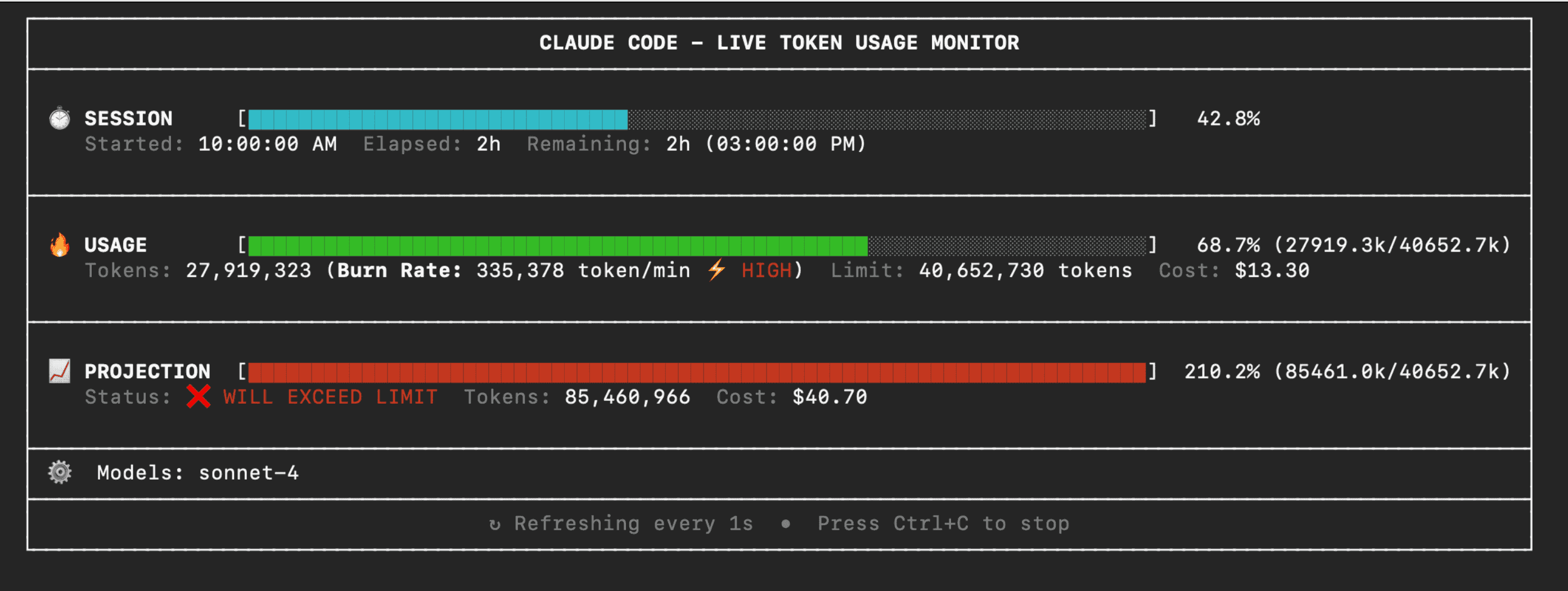
ccusage blocks --live # Real-time usage dashboard
Filters and Options
bash
# Date range filtering
ccusage daily --since 20250525 --until 20250530

# JSON output
ccusage daily --json

# Per-model cost breakdown
ccusage daily --breakdown

# Timezone configuration
ccusage daily --timezone UTC

# Locale formatting
ccusage daily --locale ja-JP
Project Analysis
bash
# Group by project/instance
ccusage daily --instances

# Filter to specific project
ccusage daily --project myproject

# Combined usage
ccusage daily --instances --project myproject --json
Compact Mode
bash
# Force compact table mode for screenshots/sharing
ccusage --compact
ccusage monthly --compact
📸 Interface Preview
✨ Key Features
- 📊 Daily Report : View token usage and costs aggregated by date
- 📅 Monthly Report : View token usage and costs aggregated by month
- 💬 Session Report : View usage grouped by conversation sessions
- ⏰ 5-Hour Blocks Report : Track usage within Claude's billing windows with active block monitoring
- 📈 Live Monitoring : Real-time dashboard showing active session progress, token burn rate, and cost projections with
blocks --live - 🚀 Statusline Integration : Compact usage display for Claude Code status bar hooks (Beta)
- 🤖 Model Tracking : See which Claude models you're using (Opus, Sonnet, etc.)
- 📊 Model Breakdown : View per-model cost breakdown with
--breakdownflag - 📅 Date Filtering : Filter reports by date range using
--sinceand--until - 📁 Custom Path : Support for custom Claude data directory locations
- 🎨 Beautiful Output : Colorful table-formatted display with automatic responsive layout
- 📱 Smart Tables : Automatic compact mode for narrow terminals (< 100 characters) with essential columns
- 📸 Compact Mode : Use
--compactflag to force compact table layout, perfect for screenshots and sharing - 📋 Enhanced Model Display : Model names shown as bulleted lists for better readability
- 📄 JSON Output : Export data in structured JSON format with
--json - 💰 Cost Tracking : Shows costs in USD for each day/month/session
- 🔄 Cache Token Support : Tracks and displays cache creation and cache read tokens separately
- 🌐 Offline Mode : Use pre-cached pricing data without network connectivity with
--offline(Claude models only) - 🔌 MCP Integration : Built-in Model Context Protocol server for integration with other tools
- 🏗️ Multi-Instance Support : Group usage by project with
--instancesflag and filter by specific projects - 🌍 Timezone Support : Configure timezone for date grouping with
--timezoneoption - 🌐 Locale Support : Customize date/time formatting with
--localeoption (e.g., en-US, ja-JP, de-DE) - ⚙️ Configuration Files : Set defaults with JSON configuration files, complete with IDE autocomplete and validation
- 🚀 Ultra-Small Bundle : Unlike other CLI tools, we pay extreme attention to bundle size - incredibly small even without minification!
💡 Use Cases
1. Monitor Daily Usage
bash
# Check today's usage
ccusage daily

# Check this month's usage
ccusage monthly
2. Project Cost Analysis
bash
# View costs by project
ccusage daily --instances

# Analyze specific project
ccusage daily --project myproject --breakdown
3. Real-time Monitoring
bash
# Launch real-time monitoring dashboard
ccusage blocks --live
4. Data Export
bash
# Export JSON data for further analysis
ccusage daily --json > usage_data.json
📖 Documentation
Full documentation is available at ccusage.com
🤔 Why Choose ccusage?
- Zero Installation Overhead : Run directly without global installation
- Lightning Fast : Ultra-small bundle size ensures quick startup
- Comprehensive Features : From basic stats to real-time monitoring
- Beautiful Output : Colorful table display with clear, readable data
- Flexible Configuration : Multiple output formats and filtering options
- Offline Capability : Works offline without network connection
ccusage is an essential tool for every Claude Code user, helping you better understand and control your AI programming costs. Try it now and make your Claude Code usage more transparent and efficient!