
Popular MCP Servers for Claude Code Users
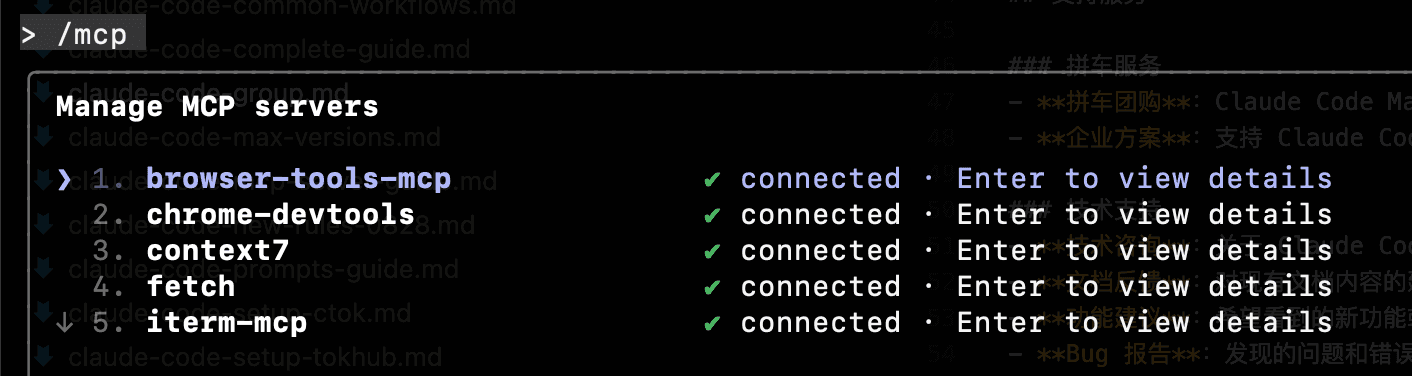
MCP (Model Context Protocol) is an open-source protocol launched by Anthropic. Adding MCP servers can significantly expand Claude Code's functionality. This article features the most popular and practical MCP servers to help you quickly boost development efficiency.
My Common Configuration:
Add the configuration to the mcpServers section at the bottom of ~/.claude.json
json
"mcpServers": {
    "browser-tools-mcp": {
      "type": "stdio",
      "command": "npx",
      "args": ["@agentdeskai/[[email protected]](/cdn-cgi/l/email-protection)"]
    },
    "iterm-mcp": {
      "type": "stdio",
      "command": "npx",
      "args": ["-y", "iterm-mcp"]
    },
    "mcp-server-sqlite": {
      "type": "stdio",
      "command": "npx",
      "args": ["-y", "@modelcontextprotocol/server-sqlite", "/Users/gump/Documents/work/data/mcp-tasks.db"]
    },
    "playwright": {
      "type": "stdio",
      "command": "npx",
      "args": ["-y", "@executeautomation/playwright-mcp-server@latest"]
    },
    "super-shell": {
      "type": "stdio",
      "command": "npx",
      "args": ["-y", "super-shell-mcp"]
    },
    "sequential-thinking": {
      "type": "stdio",
      "command": "npx",
      "args": ["-y", "@modelcontextprotocol/server-sequential-thinking"]
    },
    "context7": {
      "type": "stdio",
      "command": "npx",
      "args": ["-y", "context7-mcp"]
    },
    "fetch": {
      "type": "stdio",
      "command": "npx",
      "args": ["-y", "@modelcontextprotocol/server-fetch"]
    },
    "chrome-devtools": {
      "type": "stdio",
      "command": "npx",
      "args": ["-y", "chrome-devtools-mcp"]
    }
  }
🔥 Most Popular MCP Servers (The content below is AI-generated, read selectively)
1. Filesystem - File System Access
Rating : ⭐⭐⭐⭐⭐ Use Cases : Let Claude read/write local files, perform code refactoring, batch modifications, etc.
Quick Installation
bash
# Add access to Documents and Desktop
claude mcp add filesystem -s user -- npx -y @modelcontextprotocol/server-filesystem ~/Documents ~/Desktop

# Add entire user directory (use with caution)
claude mcp add filesystem -s user -- npx -y @modelcontextprotocol/server-filesystem ~
Typical Uses
- 📝 Batch file renaming
- 🔍 Search and analyze codebases
- 📊 Generate project reports
- 🛠️ Automated code refactoring
Notes
Security Notice
Only grant Claude access to necessary directories. Avoid granting access to the entire file system.
2. GitHub - Repository Management
Rating : ⭐⭐⭐⭐⭐ Use Cases : Manage GitHub repositories, create PRs, view Issues
Quick Installation
bash
# Install GitHub MCP server first
npm install -g @modelcontextprotocol/server-github

# Add GitHub MCP (requires GitHub Token)
claude mcp add github -s user -- npx -y @modelcontextprotocol/server-github
Configure GitHub Token
- Visit GitHub Settings > Developer settings > Personal access tokens
- Create new token, select permissions:
repo,read:org,read:user - Set environment variable:
bash
# macOS/Linux
export GITHUB_TOKEN="ghp_your_token_here"

# Windows PowerShell
$env:GITHUB_TOKEN="ghp_your_token_here"
Typical Uses
- 📋 View and manage Issues
- 🔀 Create and review Pull Requests
- 📝 Update README and documentation
- 🔍 Search code and commit history
3. PostgreSQL - Database Operations
Rating : ⭐⭐⭐⭐⭐ Use Cases : Query and manage PostgreSQL databases
Quick Installation
bash
# Install PostgreSQL MCP server
npm install -g @modelcontextprotocol/server-postgres

# Add PostgreSQL MCP
claude mcp add postgres -s user -- npx -y @modelcontextprotocol/server-postgres postgresql://user:password@localhost:5432/dbname
Typical Uses
- 📊 Data querying and analysis
- 🔧 Database schema optimization
- 📝 Generate SQL queries
- 🔍 Problem diagnosis and performance tuning
Security Recommendations
Best Practices
- Use read-only accounts for queries
- Avoid direct production environment use
- Regularly review database access logs
4. Brave Search - Web Search
Rating : ⭐⭐⭐⭐ Use Cases : Real-time web search, get latest data
Quick Installation
bash
# Get Brave Search API Key first
# Visit: https://brave.com/search/api/

# Add Brave Search MCP
claude mcp add brave-search -s user -- npx -y @modelcontextprotocol/server-brave-search
Configure API Key
bash
# Set Brave Search API Key
export BRAVE_API_KEY="your_api_key_here"
Typical Uses
- 🔍 Research latest tech trends
- 📰 Get real-time news and information
- 🌐 Find solutions and documentation
- 💡 Get programming problem answers
5. SQLite - Lightweight Database
Rating : ⭐⭐⭐⭐ Use Cases : Local data storage and analysis
Quick Installation
bash
# Add SQLite MCP
claude mcp add sqlite -s user -- npx -y @modelcontextprotocol/server-sqlite /path/to/database.db
Typical Uses
- 📊 Local data analysis
- 🗄️ Application data management
- 📝 Data import/export
- 🔍 Data migration and transformation
6. Memory - Conversation Memory
Rating : ⭐⭐⭐⭐ Use Cases : Save important information across sessions
Quick Installation
bash
# Add Memory MCP
claude mcp add memory -s user -- npx -y @modelcontextprotocol/server-memory
Typical Uses
- 📝 Save project context
- 🎯 Remember user preferences
- 📊 Track task progress
- 💡 Build knowledge base
7. Puppeteer - Browser Automation
Rating : ⭐⭐⭐⭐ Use Cases : Web scraping, automated testing
Quick Installation
bash
# Install Puppeteer MCP
npm install -g @modelcontextprotocol/server-puppeteer

# Add Puppeteer MCP
claude mcp add puppeteer -s user -- npx -y @modelcontextprotocol/server-puppeteer
Typical Uses
- 🌐 Web content scraping
- 🧪 Automated testing
- 📸 Website screenshots
- 🔍 Data collection
8. Slack - Team Collaboration
Rating : ⭐⭐⭐⭐ Use Cases : Send messages, manage channels
Quick Installation
bash
# Need Slack Bot Token
# Visit: https://api.slack.com/apps

# Add Slack MCP
claude mcp add slack -s user -- npx -y @modelcontextprotocol/server-slack
Configuration
bash
export SLACK_BOT_TOKEN="xoxb-your-token"
export SLACK_TEAM_ID="T01234567"
Typical Uses
- 💬 Send notifications and reminders
- 📊 Generate team reports
- 🔔 Event monitoring alerts
- 📝 Workflow automation
9. Google Drive - Cloud Storage
Rating : ⭐⭐⭐ Use Cases : Access and manage Google Drive files
Quick Installation
bash
# Need Google OAuth credentials
# Visit: https://console.cloud.google.com

# Add Google Drive MCP
claude mcp add gdrive -s user -- npx -y @modelcontextprotocol/server-gdrive
Typical Uses
- 📁 Document management
- 📊 Data analysis
- 🔄 File synchronization
- 📝 Collaborative editing
10. Git - Version Control
Rating : ⭐⭐⭐⭐⭐ Use Cases : Git repository operations
Quick Installation
bash
# Add Git MCP
claude mcp add git -s user -- npx -y @modelcontextprotocol/server-git /path/to/repo
Typical Uses
- 📝 Commit code changes
- 🌿 Branch management
- 🔀 Merge and conflict resolution
- 📊 View commit history
🎯 Categorized by Use Case
Developer Essentials
- Filesystem - File operations
- Git - Version control
- GitHub - Code hosting
- PostgreSQL/SQLite - Database management
Data Analysis
- SQLite - Local data analysis
- PostgreSQL - Database queries
- Puppeteer - Web data scraping
- Google Drive - Cloud data access
Content Creation
- Filesystem - File management
- Memory - Knowledge accumulation
- Brave Search - Information research
- Google Drive - Document collaboration
Team Collaboration
- Slack - Team communication
- GitHub - Code collaboration
- Memory - Shared knowledge base
- Git - Version management
🚀 Quick Start Guide
Step 1: Install Node.js
Most MCP servers require Node.js:
bash
# Check if installed
node --version
npm --version

# If not, visit https://nodejs.org to download and install
Step 2: Choose Your MCPs
Select 2-3 most needed MCP servers from the list above based on your use case.
Step 3: Install One by One
bash
# Example: Install filesystem and Git support
claude mcp add filesystem -s user -- npx -y @modelcontextprotocol/server-filesystem ~/Documents
claude mcp add git -s user -- npx -y @modelcontextprotocol/server-git ~/projects
Step 4: Verify Installation
bash
# View installed MCPs
claude mcp list

# Test functionality
claude "Help me list all files in the Documents directory"
🔧 Common Issues
Q1: MCP server installation failed?
A: Common causes and solutions:
- Node.js not installed : Install Node.js 18 or higher
- Insufficient permissions : Use
sudoor administrator privileges - Network issues : Configure npm mirror
- Path errors : Check if file path exists
Q2: How to uninstall MCP servers?
bash
# List all MCPs
claude mcp list

# Remove specific MCP
claude mcp remove <mcp-name>
Q3: MCP server using too much memory?
A: You can:
- Keep only frequently used MCPs
- Restart Claude Code
- Check MCP server logs
Q4: How to update MCP servers?
bash
# Remove old version first
claude mcp remove <mcp-name>

# Reinstall latest version
claude mcp add <mcp-name> -s user -- npx -y @modelcontextprotocol/server-<name>
Q5: Are MCPs safe?
A: Security recommendations:
- ✅ Only install MCPs from official or trusted sources
- ✅ Follow principle of least privilege
- ✅ Regularly review installed MCPs
- ❌ Don't randomly grant full file system access
🌟 Recommended MCP Combinations
Combo 1: Full-Stack Developer
bash
claude mcp add filesystem -s user -- npx -y @modelcontextprotocol/server-filesystem ~/projects
claude mcp add git -s user -- npx -y @modelcontextprotocol/server-git ~/projects
claude mcp add github -s user -- npx -y @modelcontextprotocol/server-github
claude mcp add postgres -s user -- npx -y @modelcontextprotocol/server-postgres postgresql://localhost/mydb
Combo 2: Data Analyst
bash
claude mcp add filesystem -s user -- npx -y @modelcontextprotocol/server-filesystem ~/data
claude mcp add sqlite -s user -- npx -y @modelcontextprotocol/server-sqlite ~/data/analysis.db
claude mcp add puppeteer -s user -- npx -y @modelcontextprotocol/server-puppeteer
Combo 3: Content Creator
bash
claude mcp add filesystem -s user -- npx -y @modelcontextprotocol/server-filesystem ~/Documents
claude mcp add memory -s user -- npx -y @modelcontextprotocol/server-memory
claude mcp add brave-search -s user -- npx -y @modelcontextprotocol/server-brave-search
📊 MCP Performance Comparison
| MCP Server | Startup Speed | Memory Usage | Stability | Rating |
|---|---|---|---|---|
| Filesystem | ⚡⚡⚡ | Low | ⭐⭐⭐⭐⭐ | Must-have |
| Git | ⚡⚡⚡ | Low | ⭐⭐⭐⭐⭐ | Must-have |
| GitHub | ⚡⚡ | Medium | ⭐⭐⭐⭐ | Recommended |
| PostgreSQL | ⚡⚡ | Medium | ⭐⭐⭐⭐⭐ | Recommended |
| SQLite | ⚡⚡⚡ | Low | ⭐⭐⭐⭐⭐ | Recommended |
| Puppeteer | ⚡ | High | ⭐⭐⭐ | As needed |
| Memory | ⚡⚡⚡ | Low | ⭐⭐⭐⭐ | Recommended |
| Brave Search | ⚡⚡ | Low | ⭐⭐⭐⭐ | Recommended |
🔗 Related Resources
- Claude Code MCP Server Complete Guide - Detailed configuration and debugging guide
- Serena MCP Integration Guide - Specific MCP usage tutorials
- MCP Official Repository - Latest MCP server list
- MCP Awesome List - Community-recommended MCP servers
🎉 Summary
MCP servers are a powerful extension mechanism for Claude Code. With proper use, you can:
- ✅ 10x efficiency boost - Automate repetitive tasks
- ✅ Expand capabilities - Integrate various tools and services
- ✅ Customized experience - Freely combine based on needs
- ✅ Continuous evolution - Community constantly contributes new MCPs
Beginners are recommended to start with Filesystem and Memory , then gradually explore other powerful MCP servers.
Need Help? Join Claude Code Carpool Community for professional technical support and more MCP usage tips!